 hmo
04db423416
hmo
04db423416
- 70 skills with code and documentation
- Add .gitignore (ignore __pycache__, output/, temp/, venv/)
- Clean up test intermediates and caches
126 lines
5.7 KiB
Markdown
126 lines
5.7 KiB
Markdown
<div align="right">
|
||
<details>
|
||
<summary>🌐 Language</summary>
|
||
<div>
|
||
<div align="center">
|
||
<a href="https://openaitx.github.io/view.html?user=eze-is&project=web-access&lang=en">English</a>
|
||
| <a href="https://openaitx.github.io/view.html?user=eze-is&project=web-access&lang=zh-CN">简体中文</a>
|
||
| <a href="https://openaitx.github.io/view.html?user=eze-is&project=web-access&lang=zh-TW">繁體中文</a>
|
||
| <a href="https://openaitx.github.io/view.html?user=eze-is&project=web-access&lang=ja">日本語</a>
|
||
| <a href="https://openaitx.github.io/view.html?user=eze-is&project=web-access&lang=ko">한국어</a>
|
||
| <a href="https://openaitx.github.io/view.html?user=eze-is&project=web-access&lang=fr">Français</a>
|
||
| <a href="https://openaitx.github.io/view.html?user=eze-is&project=web-access&lang=de">Deutsch</a>
|
||
| <a href="https://openaitx.github.io/view.html?user=eze-is&project=web-access&lang=es">Español</a>
|
||
| <a href="https://openaitx.github.io/view.html?user=eze-is&project=web-access&lang=pt">Português</a>
|
||
| <a href="https://openaitx.github.io/view.html?user=eze-is&project=web-access&lang=ru">Русский</a>
|
||
</div>
|
||
</div>
|
||
</details>
|
||
</div>
|
||
|
||
<img width="879" height="376" alt="image" src="https://github.com/user-attachments/assets/a87fd816-a0b5-4264-b01c-9466eae90723" />
|
||
|
||
给 Claude Code 装上完整联网能力的 skill。
|
||
|
||
Claude Code 原本有 WebSearch、WebFetch,但缺少调度策略和浏览器自动化能力。这个 skill 补上的是:**联网策略 + CDP 浏览器操作 + 站点经验积累**。
|
||
|
||
> 推荐必读:[Web Access:一个 Skill,拉满 Agent 联网和浏览器能力](https://mp.weixin.qq.com/s/rps5YVB6TchT9npAaIWKCw) ,完整介绍了 Web-Access Skill 的开发细节与 Agent Skill 设计哲学,帮助你也能写出类似通用、高上限的 Skill
|
||
|
||
---
|
||
|
||
## v2.4 能力
|
||
|
||
| 能力 | 说明 |
|
||
|------|------|
|
||
| 联网工具自动选择 | WebSearch / WebFetch / curl / Jina / CDP,按场景自主判断,可任意组合 |
|
||
| CDP Proxy 浏览器操作 | 直连用户日常 Chrome,天然携带登录态,支持动态页面、交互操作、视频截帧 |
|
||
| 三种点击方式 | `/click`(JS click)、`/clickAt`(CDP 真实鼠标事件)、`/setFiles`(文件上传) |
|
||
| 并行分治 | 多目标时分发子 Agent 并行执行,共享一个 Proxy,tab 级隔离 |
|
||
| 站点经验积累 | 按域名存储操作经验(URL 模式、平台特征、已知陷阱),跨 session 复用 |
|
||
| 媒体提取 | 从 DOM 直取图片/视频 URL,或对视频任意时间点截帧分析 |
|
||
|
||
**v2.4 更新:**
|
||
- **站点内 URL 可靠性** — 新增事实说明:站点生成的链接自带完整上下文,手动构造的 URL 可能缺失隐式必要参数
|
||
- **平台错误提示不可信** — 新增技术事实:平台返回的"内容不存在"等提示可能是访问方式问题而非内容本身问题
|
||
- **小红书站点经验增强** — xsec_token 机制、创作者平台状态校验、暂存草稿流程
|
||
|
||
<details><summary>v2.3 更新</summary>
|
||
|
||
- **浏览哲学重构** — 更清晰的「像人一样思考」框架,强调目标驱动而非步骤驱动
|
||
- **Jina 积极推荐** — 明确鼓励在合适场景主动使用 Jina 节省 token
|
||
- **子 Agent prompt 指引优化** — 明确加载写法,增加避免动词暗示执行方式的说明
|
||
</details>
|
||
|
||
## 安装
|
||
|
||
**方式一:让 Claude 自动安装**
|
||
|
||
```
|
||
帮我安装这个 skill:https://github.com/eze-is/web-access
|
||
```
|
||
|
||
**方式二:手动**
|
||
|
||
```bash
|
||
git clone https://github.com/eze-is/web-access ~/.claude/skills/web-access
|
||
```
|
||
|
||
## 前置配置(CDP 模式)
|
||
|
||
CDP 模式需要 **Node.js 22+** 和 Chrome 开启远程调试:
|
||
|
||
1. Chrome 地址栏打开 `chrome://inspect/#remote-debugging`
|
||
2. 勾选 **Allow remote debugging for this browser instance**(可能需要重启浏览器)
|
||
|
||
运行环境检查:
|
||
|
||
```bash
|
||
bash ~/.claude/skills/web-access/scripts/check-deps.sh
|
||
```
|
||
|
||
## CDP Proxy API
|
||
|
||
Proxy 通过 WebSocket 直连 Chrome(兼容 `chrome://inspect` 方式,无需命令行参数启动),提供 HTTP API:
|
||
|
||
```bash
|
||
# 启动
|
||
node ~/.claude/skills/web-access/scripts/cdp-proxy.mjs &
|
||
|
||
# 页面操作
|
||
curl -s "http://localhost:3456/new?url=https://example.com" # 新建 tab
|
||
curl -s -X POST "http://localhost:3456/eval?target=ID" -d 'document.title' # 执行 JS
|
||
curl -s -X POST "http://localhost:3456/click?target=ID" -d 'button.submit' # JS 点击
|
||
curl -s -X POST "http://localhost:3456/clickAt?target=ID" -d '.upload-btn' # 真实鼠标点击
|
||
curl -s -X POST "http://localhost:3456/setFiles?target=ID" \
|
||
-d '{"selector":"input[type=file]","files":["/path/to/file.png"]}' # 文件上传
|
||
curl -s "http://localhost:3456/screenshot?target=ID&file=/tmp/shot.png" # 截图
|
||
curl -s "http://localhost:3456/scroll?target=ID&direction=bottom" # 滚动
|
||
curl -s "http://localhost:3456/close?target=ID" # 关闭 tab
|
||
```
|
||
|
||
## 使用
|
||
|
||
安装后直接让 Agent 执行联网任务,skill 自动接管:
|
||
|
||
- "帮我搜索 xxx 最新进展"
|
||
- "读一下这个页面:[URL]"
|
||
- "去小红书搜索 xxx 的账号"
|
||
- "帮我在创作者平台发一篇图文"
|
||
- "同时调研这 5 个产品的官网,给我对比摘要"
|
||
|
||
## 设计哲学
|
||
|
||
> Skill = 哲学 + 技术事实,不是操作手册。讲清 tradeoff 让 AI 自己选,不替它推理。
|
||
|
||
详见 [SKILL.md](./SKILL.md) 中的浏览哲学部分。
|
||
|
||
## License
|
||
|
||
MIT · 作者:[一泽 Eze](https://github.com/eze-is)
|
||
|
||
## Star History
|
||
|
||
[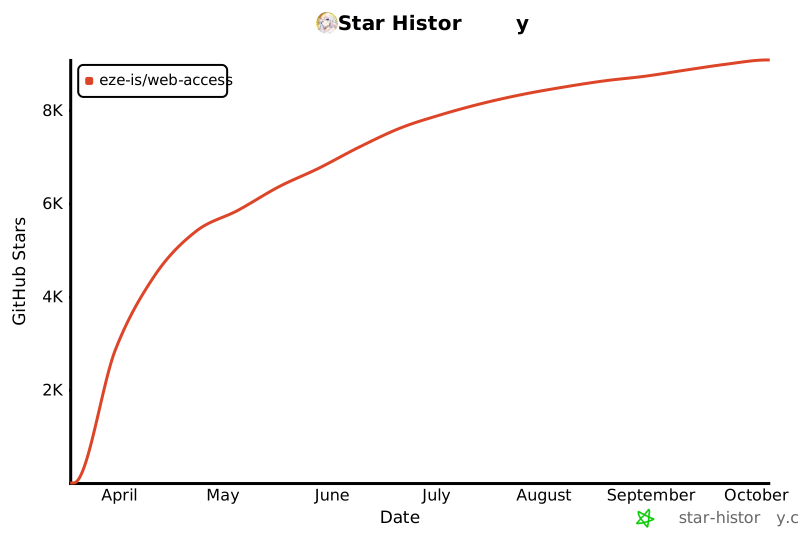](https://star-history.com/#eze-is/web-access&Date)
|
||
|
||
<img width="1280" height="306" alt="image" src="https://github.com/user-attachments/assets/2afa25c2-3730-413e-b40f-94e52567249d" />
|